Never Miss Another Deal!

No Fuss Deal Surprise Me

Lenovo V15 G2 Laptop Review: Plenty of Memory and Storage Held Back by an Entry-Level Chip

The Lenovo V15 G2 Laptop is a plenty of memory and storage held back by an entry-level chip, best for students and home users with light everyday workloads. Rated 4.1 out of 5 across 267 user ratings. The main drawback: the 45% NTSC colour range is narrow. We scored it 3.9 out of 5.

By ZappyZep, Tech Editor Published December 20, 2025 Updated September 26, 2026
3.9Our score
Lenovo V15 G2 Laptop, 15.6" FHD Screen, Intel Dual-core Processor, 16GB RAM, 1TB SSD, Webcam, HDMI, Wi-Fi, Windows 11 Home, Black Lenovo V15 G2 Laptop, 15.6" FHD Screen, Intel Dual-core Processor, 16GB RAM, 1TB SSD, Webcam, HDMI, Wi-Fi, Windows 11 Home, Black, view 2 Lenovo V15 G2 Laptop, 15.6" FHD Screen, Intel Dual-core Processor, 16GB RAM, 1TB SSD, Webcam, HDMI, Wi-Fi, Windows 11 Home, Black, view 3 Lenovo V15 G2 Laptop, 15.6" FHD Screen, Intel Dual-core Processor, 16GB RAM, 1TB SSD, Webcam, HDMI, Wi-Fi, Windows 11 Home, Black, view 4 Lenovo V15 G2 Laptop, 15.6" FHD Screen, Intel Dual-core Processor, 16GB RAM, 1TB SSD, Webcam, HDMI, Wi-Fi, Windows 11 Home, Black, view 5 Lenovo V15 G2 Laptop, 15.6" FHD Screen, Intel Dual-core Processor, 16GB RAM, 1TB SSD, Webcam, HDMI, Wi-Fi, Windows 11 Home, Black, view 6
Product gallery, 6 images

Prices shown were correct on September 26, 2026 and change frequently.

TL;DRThe Short Answer: Is the Lenovo V15 G2 Laptop Worth It?

Budget laptops usually make you choose between enough memory, enough storage and a processor that keeps up, and the V15 G2 picks the first two. With 16GB of RAM, a 1TB SSD and a full set of ports including Ethernet and HDMI, it suits students and home office users who live in a browser, documents and video calls. The catch is the dual-core Celeron N4500: it is quick for everyday work, but it slows when several demanding apps run at once.

NoFussDeal rates the Lenovo V15 G2 Laptop 3.9 out of 5 at $599.00. Last updated September 26, 2026.

Key Facts

Memory Storage Capacity
1 TB
Item Dimensions L x W x Thickness
9.28"L x 14.14"W x 0.78"Th
Color
Black
Battery Cell Type
Lithium Ion
Special Feature
Numeric Keypad
Control Method
Touch

What Stands Out

  1. Intel Celeron N4500 with 2 cores and 2 threads, running from 1.1 GHz up to 2.8 GHz with Turbo Boost
  2. 16GB of DDR4 RAM at 3200 MHz and a 1TB PCIe M.2 SSD for fast startup and plenty of room for files
  3. 15.6-inch Full HD (1920 x 1080) anti-glare display with a 60 Hz refresh rate
  4. 720p webcam with a physical privacy shutter, plus TPM 2.0 encryption, according to Lenovo
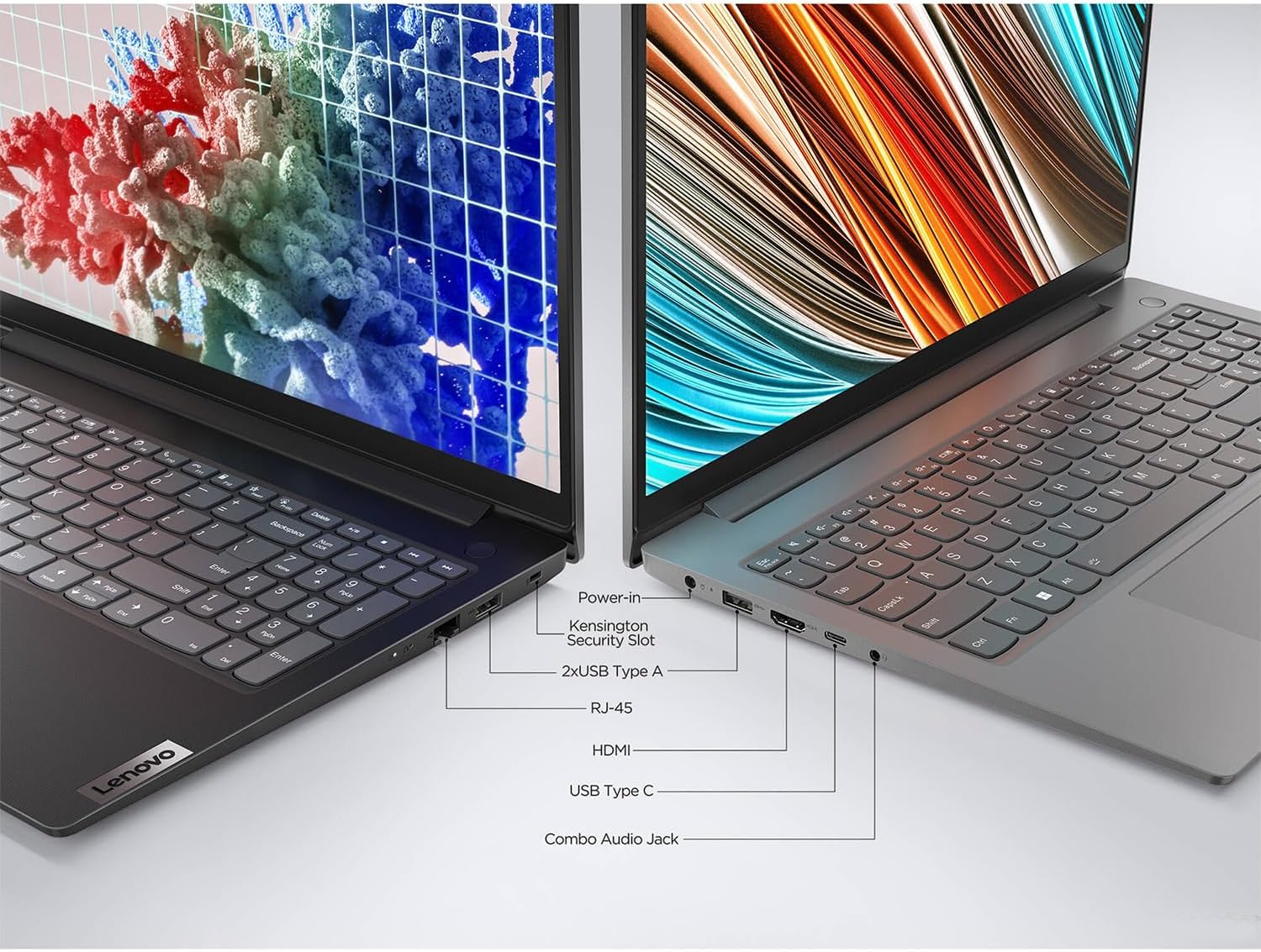
  5. USB-C 3.2, USB-A 3.2, USB-A 2.0, HDMI, RJ-45 Ethernet and a headphone/microphone jack, with Wi-Fi and Bluetooth

Strengths and Drawbacks

What works

  • 16GB of RAM keeps plenty of browser tabs and everyday apps open at once
  • 1TB PCIe SSD gives quick boot and load times
  • Full port set including USB-C, two USB-A, HDMI and Ethernet cuts down on adapters
  • Light for a 15.6-inch laptop and easy to carry
  • 720p webcam with a physical privacy shutter suits video calls
  • Matte anti-glare screen finish
  • Full-size keyboard with a numeric keypad for spreadsheets and data entry

What does not

  • Dual-core Celeron processor slows when several demanding apps run together, and multitasking is its weakest area
  • The 45% NTSC colour range is narrow, and screen quality is a mixed point
  • Durability is a mixed point
  • Performance and value are both mixed if you expect more speed

Features in Depth

01

16GB RAM Helps, But This Is Still a 2-Core Celeron Processor

RAM 16GB DDR4, 3200 MHz CPU Celeron N4500, 2 cores/2 threads Multitasking Its weakest area

Lenovo fits 16GB of DDR4 RAM at 3200 MHz, which is generous for a budget laptop and helps keep many browser tabs and apps open at once. The processor is the limit: an Intel Celeron N4500 with 2 cores and 2 threads, a 1.1 GHz base clock and up to 2.8 GHz with Turbo Boost. Multitasking is its one clear weakness, and it fits the chip. Plenty of memory keeps things open, but it cannot add processing power when several demanding tasks run together. It runs smoothly for everyday needs, yet slows slightly with Discord, Twitch and OBS running at the same time.

$599.00 3.9/5 Check price
02

1TB PCIe SSD and a 15.6-Inch Full HD Anti-Glare Screen

Storage 1TB PCIe M.2 SSD Display 15.6" FHD, anti-glare, 60 Hz Colour Range 45% NTSC

Storage is a 1TB PCIe M.2 solid state drive, which Lenovo says allows fast bootup and data transfer, and it delivers: quick boot and load times are one of its standout qualities, and a big step up from an older laptop. The 15.6-inch Full HD (1920 x 1080) display has a matte anti-glare finish, a 60 Hz refresh rate and a colour range of 45% NTSC. That colour range is narrow, so colours look muted next to a pricier screen, and screen quality is a mixed point: bright and clear enough for work and streaming, but also arguably the biggest downside, though not terrible.

$599.00 3.9/5 Check price
03

Ports That Save on Adapters

USB 1 x USB-C 3.2, 1 x USB-A 3.2, 1 x USB-A 2.0 Video and Network HDMI, RJ-45 Ethernet Wireless Wi-Fi, Bluetooth

Lenovo gives the V15 G2 a wider set of ports than many thin laptops: one USB-C 3.2, one USB-A 3.2, one USB-A 2.0, HDMI, an RJ-45 Ethernet port and a headphone and microphone combo jack, plus Wi-Fi and Bluetooth. That means a wired network connection, an external monitor over HDMI and a mouse or USB drive can all plug straight in. The HDMI port and webcam are handy for video calls and presentations on a bigger screen. Versatility is one of the laptop's two clearest strengths, and this port selection is likely part of the reason.

$599.00 3.9/5 Check price
04

Light for Its Size, With a Privacy Shutter

Thickness 0.78 inches Keyboard Full-size with numeric keypad Security TPM 2.0, webcam shutter

Lenovo puts the V15 G2 at 0.78 inches thick, and lightness is one of its clearest strengths: it is easy to carry and a practical portable workstation. The full-size keyboard includes a numeric keypad, useful for spreadsheets and data entry. For security, Lenovo lists TPM 2.0 firmware encryption and a physical webcam shutter above the 720p camera. Value for money is mixed overall: for everyday tasks it is good value, while anyone who needs more speed will feel the processor more. It is best judged as a light, well-equipped everyday machine rather than a fast one.

$599.00 3.9/5 Check price

How We Scored It

Based on
The manufacturer's published specifications and the product's live Amazon listing.
Owner rating
4.1 out of 5 on Amazon, recorded September 26, 2026
How we score
We score each thing that comes up most in owner feedback on the Lenovo V15 G2 Laptop. Eight things come up most in owner feedback: two draw praise, five split opinion and one draws mostly complaints. Its ratings average 4.1 stars (63% five stars, 13% four, 8% three and 16% one or two), so every score starts at 82, that average on a 100 point scale. Where opinion is split, we take off 6. Where it draws mostly complaints, we take off 12. Then we read six owner reviews in full (every one we found gave it four or five stars) and move the score up to 5 points either way depending on how the owners who mention it rated the product. Our overall score starts from the same 4.1 star average and loses 0.1 for each thing that draws mostly complaints, with 0.1 more when at least a tenth of ratings are one star, never more than 0.3 in all. Here that takes off 0.2, which gives 3.9. Read our editorial standards

Lightweight

The laptop's lightweight design and versatility stand out. Three of the six owner reviews we read mention it. All of them gave the product four or five stars. Score 87: we started at 82 and added 5 because the owner reviews that mention it are positive.

87Positive

Performance

Three of the six owner reviews we read mention it, and those owners gave the product four or five stars, so the complaints come from the wider group of buyers. None of the reviews we read say what goes wrong, so this score rests on the buyer ratings. 24% of all ratings are three stars or fewer, which is where complaints like this usually sit. Score 76: we started at 82 and took off 6 because opini…

Read the full note (412 characters)

Three of the six owner reviews we read mention it, and those owners gave the product four or five stars, so the complaints come from the wider group of buyers. None of the reviews we read say what goes wrong, so this score rests on the buyer ratings. 24% of all ratings are three stars or fewer, which is where complaints like this usually sit. Score 76: we started at 82 and took off 6 because opinion is split.

76Mixed

Screen Quality

Lenovo lists the screen size as 15.6 inches and the front photo sensor resolution as 2 mp. Five of the six owner reviews we read mention it, and those owners gave the product four or five stars, so the complaints come from the wider group of buyers. None of the reviews we read say what goes wrong, so this score rests on the buyer ratings. 24% of all ratings are three stars or fewer, which is where…

Read the full note (502 characters)

Lenovo lists the screen size as 15.6 inches and the front photo sensor resolution as 2 mp. Five of the six owner reviews we read mention it, and those owners gave the product four or five stars, so the complaints come from the wider group of buyers. None of the reviews we read say what goes wrong, so this score rests on the buyer ratings. 24% of all ratings are three stars or fewer, which is where complaints like this usually sit. Score 76: we started at 82 and took off 6 because opinion is split.

76Mixed

Durability

Lenovo lists the warranty type as Limited and the warranty description as 1 Year. None of the six owner reviews we read mention it. 24% of all ratings are three stars or fewer, which is where complaints like this usually sit. Score 76: we started at 82 and took off 6 because opinion is split.

76Mixed

Processor Performance

Lenovo lists the graphics coprocessor as Intel UHD Graphics and the video processor as Intel. Five of the six owner reviews we read mention it, and those owners gave the product four or five stars, so the complaints come from the wider group of buyers. None of the reviews we read say what goes wrong, so this score rests on the buyer ratings. 24% of all ratings are three stars or fewer, which is wh…

Read the full note (505 characters)

Lenovo lists the graphics coprocessor as Intel UHD Graphics and the video processor as Intel. Five of the six owner reviews we read mention it, and those owners gave the product four or five stars, so the complaints come from the wider group of buyers. None of the reviews we read say what goes wrong, so this score rests on the buyer ratings. 24% of all ratings are three stars or fewer, which is where complaints like this usually sit. Score 76: we started at 82 and took off 6 because opinion is split.

76Mixed

Multitasking

Two of the six owner reviews we read mention it, and those owners gave the product four or five stars, so the complaints come from the wider group of buyers. None of the reviews we read say what goes wrong, so this score rests on the buyer ratings. 24% of all ratings are three stars or fewer, which is where complaints like this usually sit. Score 70: we started at 82 and took off 12 because it dra…

Read the full note (421 characters)

Two of the six owner reviews we read mention it, and those owners gave the product four or five stars, so the complaints come from the wider group of buyers. None of the reviews we read say what goes wrong, so this score rests on the buyer ratings. 24% of all ratings are three stars or fewer, which is where complaints like this usually sit. Score 70: we started at 82 and took off 12 because it draws mostly complaints.

70Needs Improvement

Owner Satisfaction

63% of ratings are five stars and 13% are four. 8% are three stars and 16% are one or two. A sizable share of ratings sit low, so weigh the drawbacks below as heavily as the praise. Score 82: its 4.1 star average on a 100 point scale.

82Mostly Positive

Value for Money

Four of the six owner reviews we read mention it, and those owners gave the product four or five stars, so the complaints come from the wider group of buyers. None of the reviews we read say what goes wrong, so this score rests on the buyer ratings. 24% of all ratings are three stars or fewer, which is where complaints like this usually sit. Score 76: we started at 82 and took off 6 because opinio…

Read the full note (411 characters)

Four of the six owner reviews we read mention it, and those owners gave the product four or five stars, so the complaints come from the wider group of buyers. None of the reviews we read say what goes wrong, so this score rests on the buyer ratings. 24% of all ratings are three stars or fewer, which is where complaints like this usually sit. Score 76: we started at 82 and took off 6 because opinion is split.

76Mixed

Specifications

Size and weight

Memory Storage Capacity
1 TB
Item Dimensions L x W x Thickness
9.28"L x 14.14"W x 0.78"Th

Materials and warranty

Color
Black

Power

Battery Cell Type
Lithium Ion

Other specifications

Special Feature
Numeric Keypad
Control Method
Touch

What Buyers Say

Based on 267 Amazon customer ratings, averaging 4.1 out of 5, recorded 12 September 2026. See the reviews on Amazon

5 stars 62%
4 stars 13%
3 stars 9%
2 stars 3%
1 stars 13%
★★★★★

Perfect for my need

Very happy with purchase. Reliable Performance and Great Value for Everyday Use!The Lenovo V15 G2 has been a fantastic laptop for my daily needs. The 15.6" Full HD screen is crisp and clear,… Read it on Amazon
J3419 · January 6, 2025 · Verified
★★★★★

Excellent Performance and Value for the Price!

I’m really impressed with the Lenovo V15 G2 Laptop! The 15.6” FHD screen is bright and clear, making it great for both work and entertainment. The Intel dual-core processor, paired with 16GB… Read it on Amazon
C. Mancini · January 22, 2025 · Verified
★★★★★

Lenovo Laptop Computer

Hello, Just a quick review to let you all know what a great and easy process it is to Apply & Buy a Laptop through Affirm! The whole process takes less than 4 minutes and if you’re approved … Read it on Amazon
Reno · April 25, 2025 · Verified
★★★★★

Solid Performance and Lightweight Design - Great Value!

I purchased this Lenovo Laptop in November 2024, and I'm very pleased with my purchase. So far, I've had a good experience with it. What I enjoy most is the quick load times, which is a sign… Read it on Amazon
Stro · April 4, 2025 · Verified
★★★★★

Great Purchase

I absolutely love this laptop. I needed a windows processor so my Google Chromebook did not qualify. This has been a game changer. I love the large screen and how quickly it moves. It is a l… Read it on Amazon
Martha M. · March 23, 2025 · Verified
★★★★☆

The laptop runs great.

The laptop runs smoothly for my needs. Discord, twitch, and obs combined bogs it down Slightly. However the screen quality is the biggest downside it's not terrible but not great.
Matthew flint · October 30, 2024 · Verified

Setting It Up

  1. Initial Power-On and Windows 11 Setup

    Plug in the AC adapter, power on and follow the Windows 11 Home setup screens to choose your region, keyboard layout and network. Setup is quick and easy. Let Windows download its first round of updates before you start installing apps.

  2. Trim Startup Apps

    With a dual-core processor, fewer background apps means more speed for what you are actually doing. Open Task Manager, check the Startup tab and switch off anything you do not need running at login.

  3. Check the Webcam Shutter and Audio

    Lenovo fits a physical shutter over the 720p webcam. Make sure it is open before your first video call, then test the camera and the built-in stereo speakers and microphone in Windows settings.

  4. Set Up Storage and Backup

    The 1TB SSD leaves plenty of room for files, but keep a backup anyway. Turn on OneDrive or set up Windows Backup to an external drive so documents are safe if anything goes wrong.

  5. Connect to Your Network

    Join your Wi-Fi from the taskbar, or plug a network cable into the RJ-45 Ethernet port for a steadier wired connection, which is useful for long video calls.

  6. Add an External Display

    Connect a monitor to the HDMI port, then press Windows key + P and choose Extend to use both screens, or Duplicate for presentations.

Common Questions

Can it handle multitasking well with 16GB of RAM?

For everyday work, yes: the 16GB of RAM keeps many tabs and apps open. But multitasking is its one clear weakness, because the Celeron N4500 has only 2 cores and 2 threads. Memory keeps things open, but it cannot add processing power when several demanding tasks run at once.

How good is the display?

It is a 15.6-inch Full HD (1920 x 1080) screen with a matte anti-glare finish, a 60 Hz refresh rate and a 45% NTSC colour range. That colour range is narrow, so it suits documents and browsing better than photo work. Screen quality is a mixed point: it can look crisp and clear, but it is also arguably the biggest downside, though not terrible.

What ports does it have?

One USB-C 3.2, one USB-A 3.2, one USB-A 2.0, HDMI, RJ-45 Ethernet and a headphone and microphone combo jack, plus Wi-Fi and Bluetooth. That covers an external monitor, wired internet and most accessories without adapters.

Is the screen actually good quality?

Opinion is mixed. The display is bright and clear enough for work and streaming, but it is also the weakest part of the laptop, though still usable. If colour accuracy matters to you, plan on an external monitor over HDMI.

How durable is it long-term?

Durability is a mixed point, so experiences vary. Lenovo covers it with a 1 year limited warranty. Treat it with normal care: keep the vents clear, avoid heavy weight on the closed lid and back up your files.

Is it good for gaming or streaming setups?

Not really. The Celeron N4500 is an entry-level chip with integrated Intel UHD Graphics, built for light everyday work. Running Discord, Twitch and OBS together bogs it down slightly, which matches its weak multitasking overall.

On Video

6 videos

Review: Lenovo V15 Business Laptop | Intel 4-core Processor | Intel UHD Graphics | 15.6" FHD

Guy Reviews
All videos
  1. Review: Lenovo V15 Business Laptop | Intel 4-core Processor | Intel UHD Graphics | 15.6" FHD Guy Reviews
  2. Unboxing Lenovo V15 Business Laptop PCOnline
  3. Lenovo V15 G4 vs HP 15 : Which Laptop is Bestβ“πŸ€” Techy Melvin
  4. Lenovo V15 notebook laptop - 1 finger open test 🩳 Eu Amo Tecnologia
  5. Unboxing Lenovo V15 G3 IAP i5 12th Gen, 8GB Ram & 512GB SSD #unboxing #lenovo #shorts Tech By Ash
  6. Lenovo V15 | Celeron N4020 | 4GB RAM | 256GB SSD | 15.6” HD | Price: 30000/- πŸ‡³πŸ‡΅ Electronest Nepal

The Verdict

3.9Out of 5

The V15 G2 gets the practical things right: 16GB of RAM, a 1TB SSD, a light body for a 15.6-inch laptop and a port selection that includes Ethernet and HDMI. Startup is fast and everyday use smooth for documents, browsing, streaming and video calls. The dual-core Celeron N4500 is where it runs out of road, and multitasking is its weakest point. The screen, with a narrow 45% NTSC colour range, divides opinion. Bought for everyday work, it does the job well; bought for heavy use, it will disappoint.

Who should buy it

  • Students and home users with light everyday workloads
  • Small offices that want plenty of storage, a numeric keypad and a wired Ethernet port
  • Anyone replacing an older, slower laptop who values quick startup and a light body
  • Buyers who need full Windows 11 rather than a Chromebook, without needing much processing power

This is a laptop to buy for its memory, storage and ports rather than its speed. The 16GB of RAM and 1TB SSD mean it will not run short of room, and it is light and easy to carry. The Celeron N4500 keeps everyday tasks smooth but slows under heavier multitasking, and the screen is serviceable rather than vivid. If your day is documents, email, web apps and calls, it fits well. If you edit media, stream or keep several demanding apps running, spend on a stronger processor instead.

Check price on Amazon

More Reviews