Never Miss Another Deal!

No Fuss Deal Surprise Me

Roku 40 Select Series Review: A Simple Secondary Screen With a Few Setup Hiccups to Watch

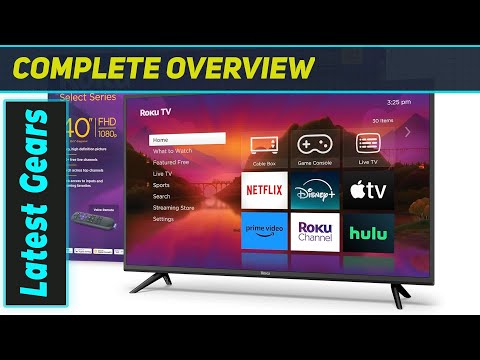
This 40-inch Roku-branded set pairs a familiar Roku OS interface with a basic 1080p LED panel, aimed at bedrooms, dorms, and secondary rooms rather than a main home-theater display. The pitch is simplicity and value in one box - remote, HDMI cable, and a protection plan included - but setup snags and hardware quirks can temper that promise.

By ZappyZep, Tech Editor Published September 26, 2026 Updated September 27, 2026
4.6Our score
Roku 40 Inch Class Select Series 1080p Full HD Smart TV WiFi LED Display Voice Remote Streaming Apps Included HDMI Cable Streaming Bundle 12 Month CPS Warranty Television Roku 40 Inch Class Select Series 1080p Full HD Smart TV WiFi LED Display Voice Remote Streaming Apps Included HDMI Cable Streaming Bundle 12 Month CPS Warranty Television, view 2 Roku 40 Inch Class Select Series 1080p Full HD Smart TV WiFi LED Display Voice Remote Streaming Apps Included HDMI Cable Streaming Bundle 12 Month CPS Warranty Television, view 3 Roku 40 Inch Class Select Series 1080p Full HD Smart TV WiFi LED Display Voice Remote Streaming Apps Included HDMI Cable Streaming Bundle 12 Month CPS Warranty Television, view 4 Roku 40 Inch Class Select Series 1080p Full HD Smart TV WiFi LED Display Voice Remote Streaming Apps Included HDMI Cable Streaming Bundle 12 Month CPS Warranty Television, view 5 Roku 40 Inch Class Select Series 1080p Full HD Smart TV WiFi LED Display Voice Remote Streaming Apps Included HDMI Cable Streaming Bundle 12 Month CPS Warranty Television, view 6 Roku 40 Inch Class Select Series 1080p Full HD Smart TV WiFi LED Display Voice Remote Streaming Apps Included HDMI Cable Streaming Bundle 12 Month CPS Warranty Television, view 7 Roku 40 Inch Class Select Series 1080p Full HD Smart TV WiFi LED Display Voice Remote Streaming Apps Included HDMI Cable Streaming Bundle 12 Month CPS Warranty Television, view 8 Roku 40 Inch Class Select Series 1080p Full HD Smart TV WiFi LED Display Voice Remote Streaming Apps Included HDMI Cable Streaming Bundle 12 Month CPS Warranty Television, view 9
Product gallery, 9 images

Prices shown were correct on September 27, 2026 and change frequently.

TL;DRThe Short Answer: Is the Roku 40 Select Series Worth It?

For anyone who just wants Netflix, Hulu, and live sports to work without fuss, this Roku Select Series aims to be the plug-and-play answer. The catch worth knowing before you mount it and toss the box: included screws may not fit and setup snags can occur, so check for them first.

NoFussDeal rates the Roku 40 Select Series 4.6 out of 5 at $189.99, compared against 4 alternatives sold on Amazon. Last updated September 27, 2026.

Key Facts

Product Dimensions
3"D x 37"W x 21"H
Wattage
90 watts
Voltage
120 volts
Color
BlacK
Special Feature
Roku OS Smart Platform Full HD LED Display Built-In Wi-Fi, Voice Search Compatible Streaming Ready
Control Method
Remote, Voice

What Stands Out

  1. 40-inch Full HD 1920x1080 LED panel gives sharper detail than standard HD for movies, sports, and everyday viewing on a secondary set.
  2. Built-in Roku OS provides one interface across Netflix, Hulu, Disney Plus, Prime Video, and YouTube without a separate streaming stick.
  3. Voice remote works with Roku's own voice search and integrates with Alexa and Google Assistant for hands-free control.
  4. Three HDMI ports plus USB and Ethernet allow a console, streaming device, and soundbar to stay connected simultaneously.
  5. Bundle includes an HDMI cable, streaming bundle, and a 12-month CPS protection plan covering mechanical and electrical issues beyond the standard warranty.
  6. The panel is listed with a 60Hz refresh rate and a 250-nit maximum brightness.

Strengths and Drawbacks

What works

  • Setup can be straightforward, with clear picture quality and good sound straight out of the box, useful for a secondary TV where expectations are modest.
  • The built-in Wi-Fi can hold up even in challenging conditions, working inside a metal-roofed shed, a setup that often blocks wireless signal.
  • Roku OS interface consolidates streaming apps into one home screen, avoiding the need for a separate streaming device.
  • Three HDMI ports plus USB and Ethernet give flexibility to keep a console, streaming box, and soundbar all connected.
  • 12-month CPS protection plan adds coverage for mechanical and electrical issues beyond the standard warranty period.

What does not

  • A unit can arrive with sheet-metal screws that don't fit the frame's threaded holes instead of proper mounting screws, needing a search for substitute hardware.
  • The same unit froze on first power-on, and standard resets had not resolved it as of that review.
  • Auto-power behavior can be confusing, with the TV turning on by itself until the cause is figured out.
  • Maximum display brightness is listed at 250 nits, modest for bright rooms with strong window glare.
  • No HDR support or 4K resolution is stated, which limits future-proofing for higher-resolution streaming content.
  • The HDMI cable, CPS protection plan, and streaming bundle are third-party additions, so support and claims for those pieces run through separate providers rather than Roku.

Features in Depth

01

Full HD 1080p LED Display

Resolution 1920 x 1080 Maximum Display Brightness 250 nit Refresh Rate 60 Hz

The panel is a 40-inch LED display at 1920x1080 resolution with a 16:9 aspect ratio, a 60Hz refresh rate, and a maximum display brightness of 250 nits. For a secondary-room TV, the manufacturer's copy says 1080p looks better than standard HD and positions it for movies, sports, and everyday viewing. The manufacturer does not state a viewing-angle or color-gamut specification, so buyers seeking wide-angle consistency for a shared living room should weigh that gap.

$189.99 4.6/5 Check price
02

Roku OS Smart Platform

Operating System Roku OS Built-In Wi-Fi Yes Streaming Apps Netflix, Hulu, Disney Plus, Prime Video, YouTube

Built-in Roku OS gives direct access to streaming channels including Netflix, Hulu, Disney Plus, Prime Video, and YouTube through one home screen, with no separate streaming stick required. This matters because a smart TV's usability lives or dies on its interface: a unified platform means one search bar and one remote instead of switching inputs between a cable box and a streaming puck. Built-in Wi-Fi connects the set to a home network directly, and it can work even inside a metal-roofed structure, a setting that typically interferes with wireless signal. Buyers who already use Roku streaming players will find the interface familiar; those wanting Apple TV+ or a platform outside Roku's channel store are not addressed in the manufacturer's specifications. The platform suits anyone prioritizing a simple, single-remote streaming setup over advanced picture-processing features.

$189.99 4.6/5 Check price
03

Voice Remote and Connectivity

Total HDMI Ports 3 USB Ports 1 Voice Assistant Compatibility Alexa, Google Assistant

The included voice remote lets users search and launch channels by speaking, and the set is compatible with Alexa and Google Assistant for smart-home integration. Connectivity runs to three HDMI ports, one USB port, and an Ethernet jack alongside Wi-Fi, which the manufacturer's copy notes can connect gaming consoles, Blu-ray players, cable boxes, and soundbars. For households running a game console plus a soundbar plus a streaming box, three HDMI inputs is enough to avoid constant unplugging, though it leaves no spare port for a fourth device. The bundle also includes a high-speed HDMI cable so a first connection is possible straight out of the box. The manufacturer does not publish an input-lag figure, so competitive gamers weighing response time have no published number to check against.

$189.99 4.6/5 Check price
04

Included Bundle and 12-Month CPS Protection

Included HDMI Cable Yes Protection Plan 12-Month CPS VESA Mount Standard 200 x 200 mm

This package bundles the TV with an HDMI cable, a streaming bundle, and a 12-month CPS protection plan covering mechanical and electrical issues beyond the manufacturer's own warranty. The manufacturer's copy is explicit that the HDMI cable, protection plan, and streaming bundle are third-party additions not provided by Roku, with the CPS plan administered independently, so their terms sit outside the TV's own coverage. This kind of bundle can add convenience for buyers who don't want to source a cable or worry about a short manufacturer warranty window, but it also means a claim on the CPS plan follows that provider's own process rather than Roku's. Buyers planning to wall-mount should confirm hardware fit before starting installation, and anyone wanting a straightforward manufacturer-only warranty should read the CPS plan's terms separately.

$189.99 4.6/5 Check price

How We Scored It

Based on
The manufacturer's published specifications and the product's live Amazon listing.
Owner rating
4.6 out of 5 on Amazon, recorded September 27, 2026
Compared against
TCL 40-Inch S3 Roku TV, INSIGNIA 43" F50 Fire TV, INSIGNIA 40" F40 Fire TV, Roku Select Series 2026, on what their Amazon listings state and, where owners compared them, what those owners say.
How we score
We score each thing that comes up most in owner feedback on the Roku 40 Inch Class Select Series. Its ratings average 4.6 stars (81% five stars, 12% four, 0% three and 7% one or two), so every score starts at 92, that average on a 100 point scale. Where opinion is split, we take off 6. Where it draws mostly complaints, we take off 12. Then we read five owner reviews in full, including the critical ones, and move the score up to 5 points either way depending on how the owners who mention it rated the product. Our overall score starts from the same 4.6 star average and loses 0.1 for each thing that draws mostly complaints, with 0.1 more when at least a tenth of ratings are one star, never more than 0.3 in all. Nothing comes off here, so it stays at 4.6. Read our editorial standards

Owner Satisfaction

81% of ratings are five stars and 12% are four. 0% are three stars and 7% are one or two. The spread skews positive, but enough ratings sit low that the drawbacks below are worth reading. One of the five owner reviews we read gave it three stars or fewer. We look for the critical ones on purpose. Score 92: its 4.6 star average on a 100 point scale.

92Positive

How It Compares

Alternatives sold on Amazon, with facts from each product's own listing. Prices are Amazon US prices on the date shown and may have changed since.
ModelFrom the listingPrice
Roku 40 Select Series
  • 40 inches, 1080p Full HD
  • 3 HDMI Ports
  • 250 nit Maximum Display Brightness
$189.99
TCL 40-Inch S3 Roku TV4.4 out of 5 · 3,514 ratings on AmazonRead our review →
  • 40 inches, 1080p Full HD
  • 3 HDMI Inputs (One with ARC)
  • 60 hertz Refresh Rate
$158.00on Sep 23, 2026
INSIGNIA 43" F50 Fire TV4.3 out of 5 · 12,419 ratings on Amazon
  • 43 inches, 4K resolution
  • 375 nit Maximum Display Brightness
  • 60 hertz Refresh Rate
See price
INSIGNIA 40" F40 Fire TV
  • 40 inches, 1080p Full HD
  • 3 HDMI Ports
  • 2 HDMI Inputs including one with eARC
See price
Roku Select Series 20264.5 out of 5 · 1,899 ratings on AmazonRead our review →
  • 40 inches, 1080p Full HD
  • 60 hertz Refresh Rate
  • Bluetooth Headphone Mode
See price

Value check

Worked out from the Amazon prices above; prices change, so check the current price before you buy.

Specifications

Size and weight

Product Dimensions
3"D x 37"W x 21"H

Power

Wattage
90 watts
Voltage
120 volts

Materials and warranty

Color
BlacK

Other specifications

Special Feature
Roku OS Smart Platform Full HD LED Display Built-In Wi-Fi, Voice Search Compatible Streaming Ready
Control Method
Remote, Voice

What Buyers Say

Setup can be easy, with clear picture and good sound for casual viewing, and the Wi-Fi can hold up even inside a metal-roofed she-shed. Out-of-box reliability is more mixed: a TV can keep turning itself on until the cause is figured out, and wall-mount hardware may not fit, with the screen freezing on first use. The star breakdown skews heavily positive, but setup and hardware fit are the areas most worth double-checking.

Based on 19 Amazon customer ratings, averaging 4.6 out of 5, recorded 23 September 2026. See the reviews on Amazon

5 stars 81%
4 stars 12%
3 stars 0%
2 stars 0%
1 stars 7%
★★★★★

Roku 40 inch

It’s in my she shed I have problems with WiFi I’ve tried everything this tv works in my she wit a metal roof
kathy kelley · September 11, 2026 · Verified
★★★★★

Easy to set up

Easy to set up, good sound, clear picture
christine sanden · June 20, 2026 · Verified
★★★★★

gift

tv was gift and very much being emjoyed
Amazon Customer w l boyles · August 21, 2026 · Verified
★★★★☆

Turns on by itself

Updated to four stars. Figured out what I was doing wrong
Frances · June 12, 2026 · Verified

Setting It Up

  1. Unbox and inventory the included parts

    Check for the remote, power cable, stand, HDMI cable, and any mounting hardware before discarding packaging. Confirming hardware fits before you commit to a wall mount can save a mid-installation scramble.

  2. Attach the stand or wall mount

    Use the 200 x 200 mm VESA pattern if wall-mounting, and verify the mounting screws thread correctly into the frame before hanging the set. Mounting a TV with mismatched screws risks the panel coming loose later, so test-fit hardware on the ground first.

  3. Connect power and let the TV boot fully

    Plug into a 120-volt outlet and allow the initial Roku OS setup screen to load before pressing buttons repeatedly. If the screen freezes on first boot, fully unplugging the set can be worth trying before contacting support.

  4. Connect to Wi-Fi or Ethernet

    Built-in Wi-Fi lets the TV stream without an external device, but a wired Ethernet connection is available for rooms with weak wireless signal, including detached structures where Wi-Fi can struggle. Ethernet is the more reliable fallback if streams buffer.

  5. Pair the voice remote and review power settings

    Complete Roku's remote-pairing prompt during setup, then check the power and CEC (device auto-power) settings if the TV turns on unexpectedly with other connected devices. Reviewing these settings early can prevent unnecessary troubleshooting later.

Common Questions

Why did my TV turn on by itself?

The TV can turn itself on, and this can be resolved once the cause is figured out. One possible cause is auto-power or CEC (device control) settings that let connected HDMI devices wake the TV. Checking the power and CEC menus after connecting new devices is the first troubleshooting step if this happens.

Does the TV come with the correct wall-mount screws?

Not always reliably: sheet-metal screws may not fit the threaded bolt holes on the frame, requiring separate hardware to be sourced. The TV supports a 200 x 200 mm VESA mount pattern, so any compatible mounting bracket should physically fit, but it's worth test-fitting screws before mounting on the wall to avoid the same issue.

What's included in the bundle besides the TV?

The bundle includes the TV itself, a remote, power cable, stand, an HDMI cable, a 12-month CPS protection plan, and a streaming bundle.

How many devices can I connect at once?

The TV has three HDMI ports, one USB port, and an Ethernet jack, so a game console, streaming device, and soundbar can all stay connected simultaneously without swapping cables. There's no spare HDMI port left over for a fourth device, so buyers with more equipment may need an HDMI switch.

Does the Wi-Fi work well in rooms with poor signal, like outbuildings?

The TV can work even in a metal-roofed she-shed where WiFi problems persisted despite trying everything, which suggests it handles some challenging environments. The Ethernet port is available as a wired fallback if streaming buffers in a weak-signal room.

On Video

6 videos

Roku Smart TV 40 Inch Select Series 1080p Full HD (unboxing / quality test)

YXLtheMAN
All videos
  1. Roku Smart TV 40 Inch Select Series 1080p Full HD (unboxing / quality test) YXLtheMAN
  2. Roku TV 40" FHD 1080p Select Series Smart TV Dolby Audio Unboxing Setup Review Walmart 40ba 40r3bx DaveWeLike
  3. Roku 40-Inch Select Series: The Smart TV That Makes Sense Gadgets Lab
  4. Is the Roku 40-Inch Select Series Worth Buying? Full Review GadgetsFlow
  5. Roku TV Select Series: How to Setup for Beginners WorldofTech
  6. Roku Smart TV 2026 Review (Select Series) | 32" 1080p vs 40" vs 24 ShopSmart

The Verdict

4.6Out of 5

The Roku 40 Inch Select Series succeeds at exactly what it sets out to do: deliver a familiar, easy-to-navigate Roku OS interface on a basic 1080p LED panel for a bedroom, dorm, or guest room. The trade-off is that this is a budget-tier 1080p, 250-nit, non-HDR panel with no published input-lag figure, so it isn't built to compete as a main living-room or gaming display. Hardware-fit or setup issues can occur during install, so it's worth checking parts against the box contents before mounting. Compared with similarly sized 1080p rivals, this set costs more than most of them, though it undercuts a far pricier 1080p Fire TV model; its rating tops the cheaper 4K Fire TV's but rests on far fewer ratings, so the premium is hard to justify on value alone. For anyone wanting a no-frills smart TV with the Roku ecosystem built in, and who keeps expectations aligned with its 1080p, non-4K spec sheet, it covers the basics.

Who should buy it

  • Buyers wanting a simple secondary TV for a bedroom, dorm, or guest room rather than a primary home-theater display.
  • Anyone already invested in Roku's streaming ecosystem who wants one consistent interface without a separate streaming stick.
  • Households needing multiple HDMI inputs for a console, streaming box, and soundbar on one set.
  • Buyers who value having a protection plan bundled in for extra peace of mind on mechanical or electrical issues.
  • Those in rooms with challenging Wi-Fi conditions who want built-in wireless without adding an external streaming device.

Who should skip it

  • Anyone wanting 4K resolution or HDR support for movies and streaming content, since this model is 1080p only.
  • Gamers seeking a documented low input-lag spec, which isn't published for this set.
  • Buyers planning a wall mount who aren't prepared to double-check or source their own mounting hardware.
  • Households wanting a bright, glare-resistant screen for sunlit rooms, given the modest 250-nit maximum brightness.
  • Anyone who wants all included accessories covered under the TV's own manufacturer warranty, since the HDMI cable, streaming bundle, and CPS plan are administered separately.

As a budget 1080p Roku-powered TV for a secondary room, it does the basics well, but budget time for the occasional setup hiccup before you finish the install.

Check price on Amazon

More Reviews